ChopShop · Sprite animation tool
“I needed a way to custom-cut sprite sheets. Work for my logo and animation business was taking forever, but I wasn’t sure how to build an app myself. East of Oakwood helped me do that. It’s built exactly around my workflow, and any changes are just a chat message away. I’m creating animations 10 times faster now.
“If I change how I work, East of Oakwood can change the software just as quickly.”
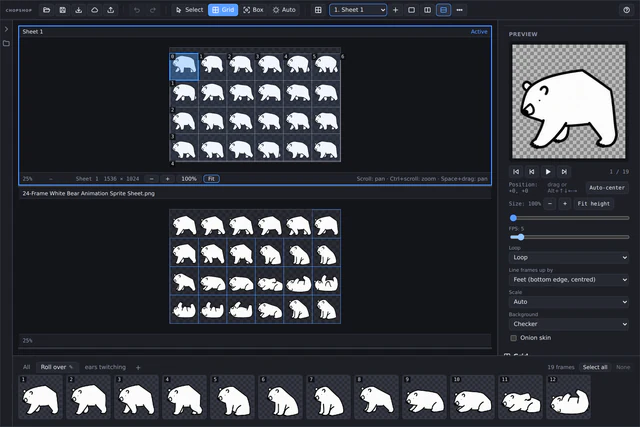
Our customer needed to cut parts out of sprite sheets where the drawings weren’t quite lined up. A fixed grid couldn’t reliably capture each pose, so we built ChopShop to cut frames individually and adjust their alignment. You can cut frames, arrange them, and set their timing in the same tool.
ChopShop prepares animated characters, logos, and other artwork. It’s a tool built for a specific job, with controls that match the way the animator works.
Cut sheets into sprites
Use a regular grid, draw individual boxes, or detect sprites automatically. Grid offsets and spacing accommodate different sheet layouts; trimming and snap-to-content help remove empty space around the artwork.
Keep a whole character together
A project can contain several sprite sheets and named animations. Build separate sequences for different movements, select frames in the filmstrip, and duplicate, flip, rename, or copy them between animations.
Get the movement right
Play a sequence, scrub through it, and adjust its speed. Loop, play once, or use ping-pong playback. Onion skin shows the previous frame faintly behind the current one, helping you line up the movement.
Control each frame
Align sprites by their feet, centre, corner, or a chosen point. Move individual sprites in the preview, adjust their size, and set frame durations to refine an animation’s positioning and rhythm.
Export for the next step
Download individual frames as a ZIP, a packed sprite sheet with Aseprite JSON, or an animated GIF or WebP. Export the current animation or all animations, with options for image format, scale, and uniform cells.
Pick up where you left off
Save and load a ChopShop project file or keep a project on the server. Keyboard shortcuts, undo and redo, zoom, and panning support the repeated adjustments that sprite work involves.
ChopShop in action
Read the walkthrough description
This silent demonstration loads the cat project from the Projects panel. With the panel closed, the pancake animation briefly shows the cat flattening and standing back up. The visible mouse pointer then opens the export controls and selects the animated GIF and WebP options.
From sprite sheet to animation
Let’s build it.
Have a project in mind, or want help figuring out where AI fits? Tell us a little about it.